

AI AGENTS
What Are AI Agents? The Complete Guide on How They Work, Types, and Use Cases



Most teams meet AI through chatbots, recommendation systems, or some “AI-powered” feature that quietly sits in the background. Useful, sure, but predictable. AI agents are different. They don’t wait for instructions; they step into the mess of real-world work and start making decisions, resolving tasks, and moving things forward.
If traditional software is a to-do list, AI agents are the colleague who picks up the list, asks a few questions, and gets the job done, even when something unexpected happens. They plan. They adapt. They learn.
And unlike the hype around “AI revolutions,” the shift is already happening quietly in finance teams, operations, customer support, logistics, and dozens of other places where messy workflows once slowed everything down.
This guide walks you through what AI agents really are, how they work under the hood, and how companies are using them today.
What Are AI Agents?
AI agents are intelligent software systems that are able to pursue goals and complete tasks autonomously.
In addition to natural language processing, AI agents are also capable of decision-making, reasoning, planning, writing code, as well as designing workflows and using external tools on their own in order to solve problems.
Think of an AI agent like a space probe launched on a mission to explore a new planet. You define its mission, such as gathering samples, analyzing the environment, taking photos, and sending data back to Earth.
But, once it’s out there, the probe has to operate on its own by avoiding obstacles, navigating storms, and adapting to the new environment.
AI agents work inside digital environments in much the same way, using natural language processing of large language models (LLMs) to understand context, respond to inputs, use tools or APIs to act, or even involve other agents in case of complex workflows.
In other words, Ai agents solve problem, break down broad goals into specific actions, and learn and adapt continuously, all on their own.
Key Principles of AI Agents
Here are some of the core principles that make AI agents not only intelligent, but fundamentally different from traditional automation software:
Autonomy: Agents take action on their own. Not because someone wrote a rule for every scenario, but because they can interpret the situation and choose what makes sense.
Goal-Oriented: Every decision points back to a target: saving time, reducing cost, boosting accuracy, improving safety — whatever you define.
Reasoning: Agents compare options, weigh trade-offs, and pick the path that maximizes the desired results.
Perception: Agents constantly gather data from APIs, systems, or sensors to understand what’s changing.
Continuous Learning: They learn from successes and mistakes, sharpening their accuracy with real-world experience.
Adaptability: Rules break when reality changes. Agents don’t.
Collaboration: They can coordinate with humans or other agents to handle complex, multi-step work.
The Core Loop: Observe, reason, act, learn, and refine loop is the heartbeat of every AI agent.
Why AI Agents Matter
AI agents matter because they finally automate the kinds of work that never fit into neat rules or rigid workflows. Most tools can handle a straight line; agents handle the zig-zags — the missing information, the unexpected blockers, the tasks no one remembers until they break something.
Teams feel the difference the first time an agent quietly resolves something end-to-end. Not reporting it. Not asking for permission. Just fixing it — updating a record, collecting missing data, checking three systems, or nudging a stalled process back on track.
The impact isn’t abstract. Finance teams stop chasing invoices. Support teams stop stitching together tool data. Operations teams stop fighting fires caused by tiny delays that snowball.
The moment people see this kind of autonomy in action, they stop thinking about automation as a set of rules and start treating it as real help. Agents matter because they take the small, constant friction out of daily work — the stuff humans never had time for, but always paid the price for ignoring.
How AI Agents Work

They follow a clear loop: understand the situation, figure out what needs to happen, and then actually do it – adjusting along the way. Here’s how that plays out inside a real workflow.
Establishing the Current State
An agent’s first job is to figure out what’s going on. Real tasks rarely arrive with full context, so the agent pulls information from whatever systems it has access to. This part benefits from bullets because it’s literally inputs:
- APIs and business systems
- Databases and logs
- Recent messages or tickets
- Documents or user input
The point is simple: without an accurate snapshot of reality, everything afterward collapses.
Interpreting the Situation
This is where agents stop behaving like automation scripts and start behaving like problem-solvers. The agent looks at the gathered data and tries to understand the actual task:
Is something missing? Is the request ambiguous? Does the goal conflict with existing information?
This step is reasoning — the thing humans do instinctively but software traditionally couldn’t. It’s what allows the agent to respond sensibly when the task isn’t perfectly defined.
Mapping Out a Plan
With a clear understanding of the situation, the agent creates a plan. Not a rigid sequence, but a working outline it can adjust as needed.
A typical plan might look like this (short list because it’s illustrative, not exhaustive):
- validate information
- retrieve missing data
- compare sources
- update a system
- notify someone
- move to the next step
If something changes mid-task, the plan changes with it. This flexibility is what lets agents survive real-world complexity.
Mapping Out a Plan
With a clear understanding of the situation, the agent creates a plan. Not a rigid sequence, but a working outline it can adjust as needed.
A typical plan might look like this (short list because it’s illustrative, not exhaustive):
- validate information
- retrieve missing data
- compare sources
- update a system
- notify someone
- move to the next step
If something changes mid-task, the plan changes with it. This flexibility is what lets agents survive real-world complexity.
Executing Through Tools and Systems
This part works better in prose because it’s continuous action, not checkboxes.
Once the plan is in place, the agent starts doing the work. It calls APIs, updates records, triggers workflows, sends messages, or even writes small pieces of code if the task requires it.
The key difference from traditional automation is that you’re not dictating the order or method — the agent chooses the right tools as it moves through the task.
Evaluating What Just Happened
After each action, the agent checks whether the step actually helped. Did the update succeed? Did the situation change? Did a new constraint appear? If the result isn’t what it expected, the agent adjusts the plan and tries a different angle.
Improving With Each Run
This part needs real explanation, not two sentences.
Agents accumulate experience over time. They remember which paths usually work, which ones fail, the patterns behind common mistakes, and the edge cases that tripped them up before. They store previous outcomes, user corrections, and environmental cues.
Over repeated runs, this creates a noticeable shift: fewer missteps, faster decisions, and a sense that the agent “anticipates” problems instead of merely reacting to them.
Key Components and Architecture of AI Agents
Even though AI agents feel flexible, their architecture is surprisingly straightforward. Most agents are built from a small set of components that handle different parts of the workload.
The Planner: This is the part that decides how to approach a task. It looks at the goal, interprets the situation, and generates a step-by-step plan that can change as new information appears.
The Reasoning Engine (LLM): The “thinking” layer. It interprets instructions, weighs options, resolves ambiguity, and makes decisions when the path isn’t obvious. It’s what lets the agent adapt instead of freezing when something unexpected happens.
Memory: Short-term memory holds context for the current task; long-term memory stores past outcomes, corrections, and useful patterns. Memory is what allows agents to improve instead of restarting from scratch every time.
Tools and Integrations: Agents get real work done by interacting with the outside world: calling APIs, updating databases, sending messages, running functions, or even collaborating with other agents. Tools are their hands.
The Environment: This is the digital space the agent operates in — business systems, documents, logs, user input, and real-time events. The environment shapes what the agent perceives and how it acts.
AI Agents vs Every Other AI Technology
A lot of tools get labeled as “AI,” and most of them look similar at a glance. They answer questions, automate tasks, or give suggestions. But once you see an AI agent actually run, the differences become clear.
Here’s the straightforward breakdown.
AI Agents vs Chatbots
Chatbots wait. You ask, they answer. Then they stop. They don’t fetch missing data unless prompted, they don’t continue working after the conversation ends, and they don’t make decisions on their own.
AI agents do the opposite. They don’t need someone to nudge them. They notice a missing invoice, a stalled workflow, or an inconsistent record, and they move. What makes AI agents different than chatbots is that chatbots is the fact that agents act, and chatbots talk.
AI Agents vs AI Assistants
AI assistants help humans get work done faster: drafting emails, generating code, summarizing documents, filling forms, cleaning data. But you’re the one steering the process. They speed up work, they don’t own the work.
Assistants operate inside a single moment. Agents operate across time.
An AI assistant can help you write a query. An AI agent notices the system is missing data, finds the source, updates the record, verifies correctness, and closes the loop, without you even opening the tool.
In other words, the difference between AI agents and AI assistants is this: assistants are amplifiers, agents are autonomous problem-solvers.
AI Agents vs RPA (Robotic Process Automation)
RPA is powerful but rigid. It works perfectly when every step is predictable and breaks the moment a field moves, a value changes, or the interface shifts.
AI agents aren’t tied to brittle scripts. They interpret what’s happening and adjust. Where RPA needs perfect consistency, agents handle real-world inconsistencies without falling apart.
AI Agents vs Workflow Automation Tools
Workflow platforms chain actions together based on predefined triggers: “When X happens, do Y.” They’re great — until you hit exceptions, branching logic, or tasks where steps depend on reasoning rather than rules.
Agents don’t need predefined flowcharts. They create their own next steps based on context and goals. A workflow tool follows a map; an agent finds a route even when the map is incomplete.
AI Agents vs Predictive Models
Predictive models tell you what’s likely to happen. They don’t decide what to do about it.
Agents fold predictions into a larger decision-making cycle, choosing actions, executing them, checking results, and adjusting the plan when reality surprises them.
AI Agents vs Agentic AI
These terms sound similar but refer to different things. AI agents are the actual systems doing work: checking data, fixing issues, coordinating workflows, or completing multi-step tasks on their own. They’re concrete, goal-driven pieces of software.
Agentic AI is the underlying capability that makes those agents possible: the reasoning, planning, tool use, and adaptation that let a system decide what to do next instead of following a fixed script.
Put simply: agentic AI is the behavior; AI agents are the practical implementation of that behavior in real workflows.
Types of AI Agents
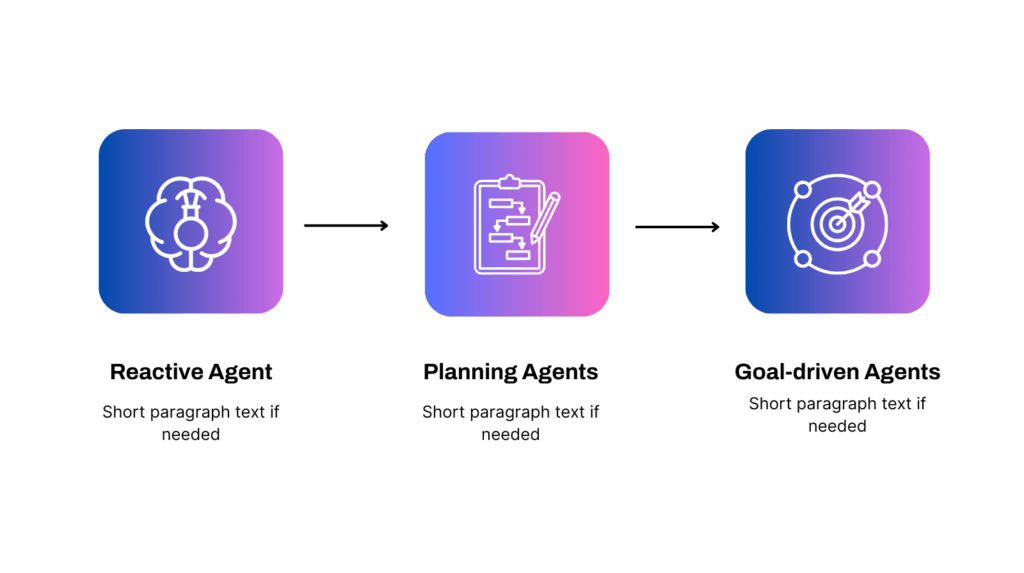
AI agents fall into several practical categories. Most real systems combine traits from multiple types, but these groups make it easier to understand how different agents behave in real workflows.
Reactive agents – Respond to whatever is happening right now, without planning or memory. Good for monitoring, alerting, quick checks, and simple decisions. Fast, but not suited for long or complex tasks.
Deliberative (planning) agents – Break goals into steps, choose the best path, and adjust when conditions change. Useful for coordination, resolution workflows, and multi-step processes. Flexible but slower because they reason before acting.
Learning agents – Improve over time by storing outcomes, detecting patterns, and using feedback to refine decisions. Ideal for predictive tasks like maintenance, fraud scoring, prioritization, or forecasting. They get better the more they run.
Tool-using agents – Use external tools, APIs, code, functions, or systems to actually execute work. They can update records, run scripts, query databases, send messages, or orchestrate tools. They don’t just “decide” — they do.
Multi-agent systems – Work delivered by several agents collaborating on different parts of the process. One gathers data, another analyzes, another executes. Common in support pipelines, finance checks, and multi-step investigations. Great for specialization.
Hierarchical agents – Structured like a team: a manager agent handles goals, planning, and oversight, while worker agents execute the details. Useful for large, cross-system workflows with shifting priorities or dependencies.
AI Agent Applications: Real-World Use Cases
Here are the areas where AI agents already prove themselves in day-to-day operations.
Finance and Accounting Automation
AI agents handle the work accountants never have time for: chasing missing invoices, matching transactions across systems, checking compliance rules, reconciling statements, flagging anomalies, and closing loops that normally drag on for days. They do not wait for month-end. They keep the data clean continuously.
Customer Support and Ticket Resolution
Support teams use agents to triage issues, gather missing context, check user history, propose fixes, update systems, and even resolve simpler requests outright. Instead of a queue full of low-level noise, human agents focus on the cases that truly require judgment.
Operations and Process Coordination
In operations-heavy teams, agents manage the bottlenecks people cannot monitor around the clock: stalled orders, failed handoffs, missing data, inconsistent records, overdue approvals, or processes stuck between tools. They notice friction, step in, and keep the system flowing.
Sales and Marketing Enablement
Agents collect intel from CRM, email threads, product usage, and market signals to enrich leads, update contact records, prioritize opportunities, and prep reps before meetings. No more hour-long research sessions. The agent delivers the essentials automatically.
IT, Security and Infrastructure Monitoring
IT teams deploy agents to scan logs, detect misconfigurations, track failed jobs, verify permissions, and follow up on unresolved incidents. Instead of a growing pile of alerts that no one reads, the agent investigates and resolves what it can before a human touches it.
HR, Talent and Internal Operations
Recruitment workflows, onboarding steps, PTO approvals, and internal requests all involve repetitive checks and follow-ups. Agents take over the administrative part. They gather documents, update systems, notify managers, and close out tasks that usually get buried.
Compliance and Risk Management
Compliance work is full of routine verifications: document checks, policy alignment, audit trail gathering, and cross-system validation. Agents excel here because they can continuously monitor for gaps, enforce rules, and prepare evidence automatically.
Benefits of AI Agents
AI agents create value in the everyday work that usually falls through the cracks, the parts no one notices until they become delays.
More time for real work: By removing background noise, agents give teams the space to focus on work that benefits from judgment, creativity, or strategic thinking. The workday stops being dominated by small interruptions and starts feeling intentional again.
Less manual work: Agents take over the repetitive tasks that quietly consume hours every week. This includes gathering missing information, checking fields across systems, comparing records, verifying status, and cleaning up steps that normally require someone to stop what they are doing.
Cleaner data: Instead of waiting for end of week or end of month cleanup cycles, agents correct issues in real time. They spot inconsistent entries, outdated values, incorrect formats, and missing documentation the moment it appears.
Faster cycle times: Processes move faster when blockers do not linger. Agents notice stalled steps, overdue actions, missing approvals, or tasks sitting untouched, and resolve them immediately.
More consistent results: Human performance varies based on workload, distractions, or simple fatigue. Agents handle tasks with the same logic and care every time.
Better scalability: When workload increases, agents absorb the additional volume instead of forcing teams to stretch or hire for routine administrative tasks.
Quicker resolutions: Internal and external requests close faster because agents eliminate the back and forth that usually slows progress. They gather context, update systems, and complete simple resolutions without waiting for human action.
Risks and Challenges of Using AI Agents

AI agents are powerful, but they introduce new kinds of risks that teams must understand before relying on them in production.
Unpredictable Behavior in Edge Cases
Agents make decisions based on context, which means they can take unexpected paths in rare or poorly defined situations. When an edge case appears that the agent has never seen, it may choose an action that technically makes sense but is operationally wrong. Guardrails, clear boundaries, and tight testing matter more here than with traditional automation.
Quality of Data and Inputs
Agents are only as reliable as the information they receive. Incomplete records, conflicting values, outdated fields, or messy system integrations can push an agent toward the wrong conclusion. If the environment is inconsistent, the agent’s reasoning becomes inconsistent too.
Over Automation Without Oversight
Once agents start closing loops automatically, teams may assume everything is handled. This creates a risk where mistakes go unnoticed longer because there is less human involvement. Regular audits and monitoring loops are essential, not optional.
Integration and Permission Risks
Agents need access to tools, systems, and data to work effectively. Giving them broad permissions can introduce security and governance challenges. The agent might perform a correct action in the wrong place or update a system it should not touch. Least privilege access and controlled scopes are critical.
Difficulty Debugging Decisions
Agents reason through tasks instead of following a fixed script, which means their thought process can be harder to trace. When something goes wrong, teams cannot just check a step-by-step workflow. They must inspect logs, memory, and context to understand why the agent made a certain choice.
Best Practices for Implementing AI Agents
Successful AI agent deployments come from clear goals, steady iteration, and strong guardrails rather than big one-shot launches.
Start with a real bottleneck: Choose a workflow where delays, missing information, or repetitive checks create constant drag. Agents succeed fastest where the pain is obvious and measurable.
Give the agent a clear goal: Vague objectives create unpredictable behavior. Define exactly what the agent is responsible for, what success looks like, and what it should ignore.
Limit the initial scope: Early agents should operate in a narrow environment with a controlled set of tools. Scoping keeps mistakes small and makes debugging easier.
Build in guardrails and permissions: Use least privilege access, environment boundaries, and explicit action limits. This prevents the agent from touching the wrong systems or making irreversible changes.
Create a strong feedback loop: Review actions, outcomes, and mistakes regularly. Agents improve only when teams feed back corrections and refine the rules of the environment.
Monitor decisions continuously: Logging, audit trails, and traceable reasoning matter. Visibility lets teams catch issues early and understand why the agent behaved a certain way.
Expand gradually based on evidence: Once the agent consistently handles its initial scope, broaden its access or assign new tasks. Growth should follow demonstrated reliability, not enthusiasm.
Conclusion – Run on Our AI Agents
AI agents are not futuristic or abstract. They are practical systems that take on the work teams struggle to keep up with: the follow ups no one remembers, the missing data that slows everything down, the handoffs that break, and the small decisions that pile up.
What makes agents different from every tool before them is their ability to understand context, choose the next step, and move a task forward even when the workflow is not perfectly defined.
The real benefit appears once an agent closes its first loop on its own. That moment changes how teams think about automation and reveals how much time is lost to small, preventable friction.
Adopting agents is not about replacing people. It is about giving teams space to focus on the work that can only be done by humans while the software handles the rest. The companies that learn this early will feel the shift first.
Ready to see how AI agents could streamline your day to day operations? Check out SmartCat’s Company Mind Assistant, explore our agent solutions, or book a strategy session to get clear next steps.
FAQ
Here are the questions teams ask most often when they start working with AI agents.
What makes an AI agent different from automation or workflows?
Automation follows predefined steps. Workflows move data between tools. Both break when something unexpected happens. AI agents reason about the situation, choose the next step, gather missing information, and adjust when the environment changes.
They can finish tasks without someone scripting every path. This flexibility is what allows them to handle real operational work instead of only clean, linear processes.
Do AI agents replace people or just support them?
Agents remove the repetitive, low judgment tasks that slow teams down. They close loops, collect information, fix inconsistencies, and keep things moving. People still own decisions that require context, expertise, or nuance.
The practical pattern is simple. Teams stop wasting time on drudge work, and humans focus on the parts of the job that actually require them.
How reliable are AI agents in production environments?
Reliability depends on guardrails, monitoring, and the quality of the environment. With clear goals, scoped permissions, and good data, agents perform consistently and improve over time. They are not plug-and-play systems.
They need oversight, logging, and a review cycle. Once these foundations are in place, agents become dependable parts of day-to-day operations.
How long does it take to implement an AI agent?
A small, well-scoped agent can be deployed in days or weeks. Larger agents that interact with multiple systems or require strong governance take longer.
The speed mostly depends on access to tools, data quality, and how clearly the workflow is defined. Starting small and expanding gradually is the fastest and safest approach.
What types of tasks are best suited for AI agents?
Agents excel at work that requires gathering information, making small decisions, updating systems, and following through on multi-step tasks. Examples include resolving tickets, reconciling records, coordinating handoffs, monitoring processes, and fixing inconsistencies.
Any workflow that regularly stalls, relies on repeated checks, or produces avoidable errors is a strong candidate for an agent.
Related blog posts:

Business
Data Science
Using Big Data analytics and Advanced Reporting in retail: A game-changer for convenience stores
In the fast-paced world of retail, convenience stores face many daily challenges: managing inventory, staying competitive, meeting customer demands, and adapting to changing market trends. In this article, we’ll explore the benefits (and challenges) of a data-driven approach to retail and use cases.

|
Jun 22, 2023

AI AGENTS
Chatbots
AI Agent vs Chatbot: What’s the Difference and Which Does Your Business Need?
Do you want more efficient workflows, better insights, and less manual work? Of course you do. And so does every business. Research shows that 78% of respondents say that their companies use AI for at least one of their business functions. But not all AI solutions are created equal. More importantly, you need to know […]

|
Oct 09, 2025

Building Custom Transformers in PySpark for Smarter ML Pipelines
When working with big data, PySpark is commonly used for data preprocessing and transformation at scale. While built-in PySpark ML transformers like StandardScaler or StringIndexer handle many common tasks, real-world use cases often require custom transformations tailored to your data and domain. That’s where custom PySpark ML transformers come in, allowing you to embed custom […]

|
Jun 12, 2025